Staging — test environment. Purchases use sandbox payments.
THE MEETING TIMER FOR MAC
Stay ahead of your meetings.
Interval is a meeting companion for Mac that lives at the edge of your screen. Count down to starts and endings, join calls in one click and spot overlaps before your next call.
Website lifetime access · £15.99 once · Two Macs · macOS 26+
Pay before download. No website trial.
The Edge · a 30-second film with fictional meetings, music and sound effects. Captions and a readable sequence.
- Apple Calendar
- Zoom, Meet, Teams, Webex & FaceTime links
- Read-only & on-device
TRY IT ON THIS PAGE
Press the buttons.
It’s the real layout.
Switch between a meeting, its notes and the wrap-up, extend the timer and edit the example note. Nothing leaves this page.
More listening.INTERVAL / FOR MAC
01 / A QUIETER WAY TO MEET
A meeting timer
at the edge of your Mac.
Meet the small companion at the edge of your screen.
Open it
when you need it. Let it fold away when you don’t.
Choose your calendars.
Grant read access and pick the Apple Calendar calendars you want in your day. Interval never edits events or invitations.
Starts and endings, in view.
See when your next meeting starts and how long this one has left. Keep the countdown at the edge of your Mac.
Put it on any edge.
Slide Interval to the left, right, top or bottom of your screen, then fold it into a compact timer when you want the space.
02 / FROM INVITE TO WRAP-UP
Every meeting,
minute by minute.
Interval follows each meeting in your selected calendars, before, during and after the call, so you never have to open Calendar to check the time.
-
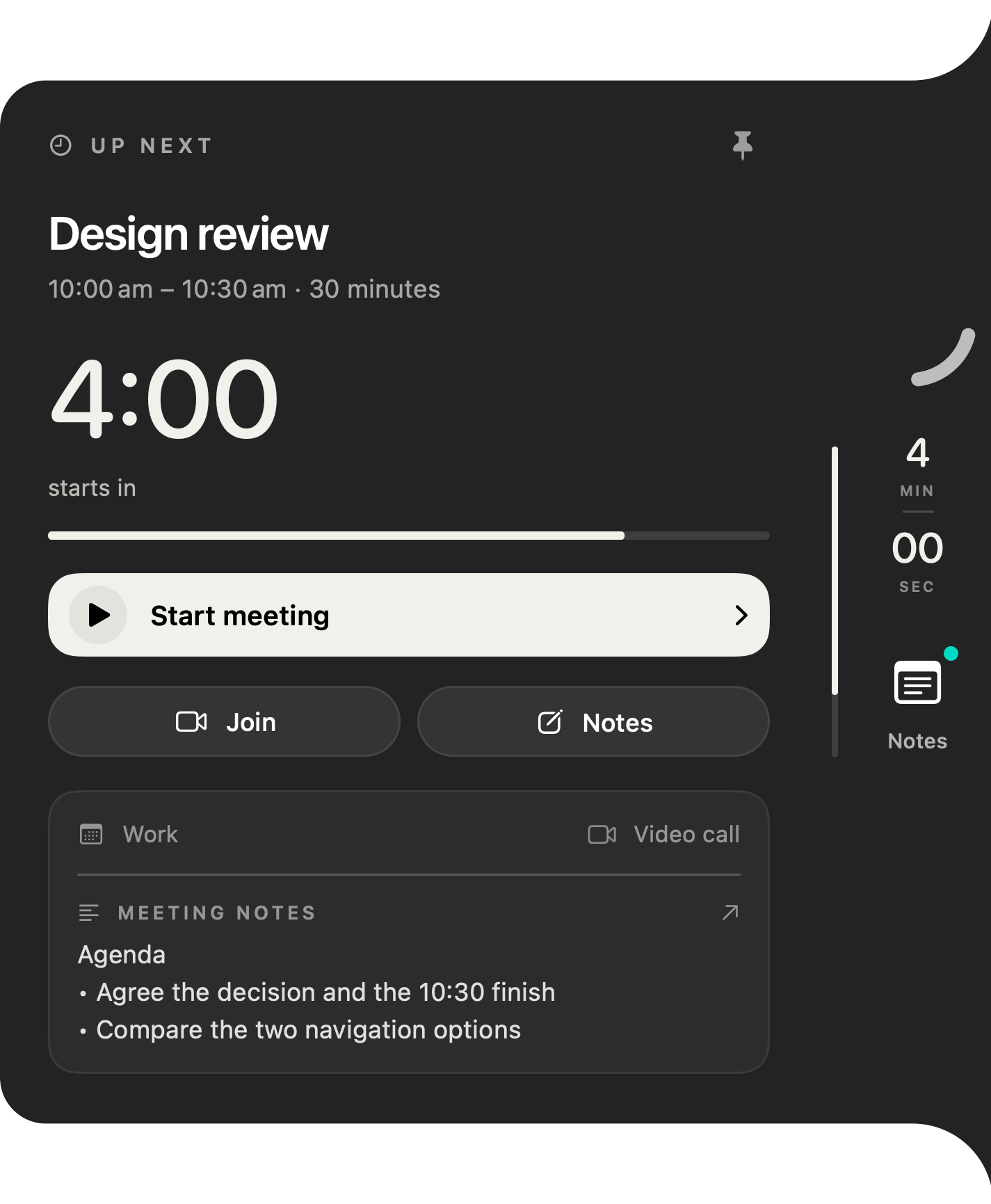
Before it starts
Know when to join.
Inside the preparation window you choose, Interval counts down to the start. When it’s time, open the meeting’s Zoom, Google Meet, Microsoft Teams, Webex or FaceTime link from the panel.
-
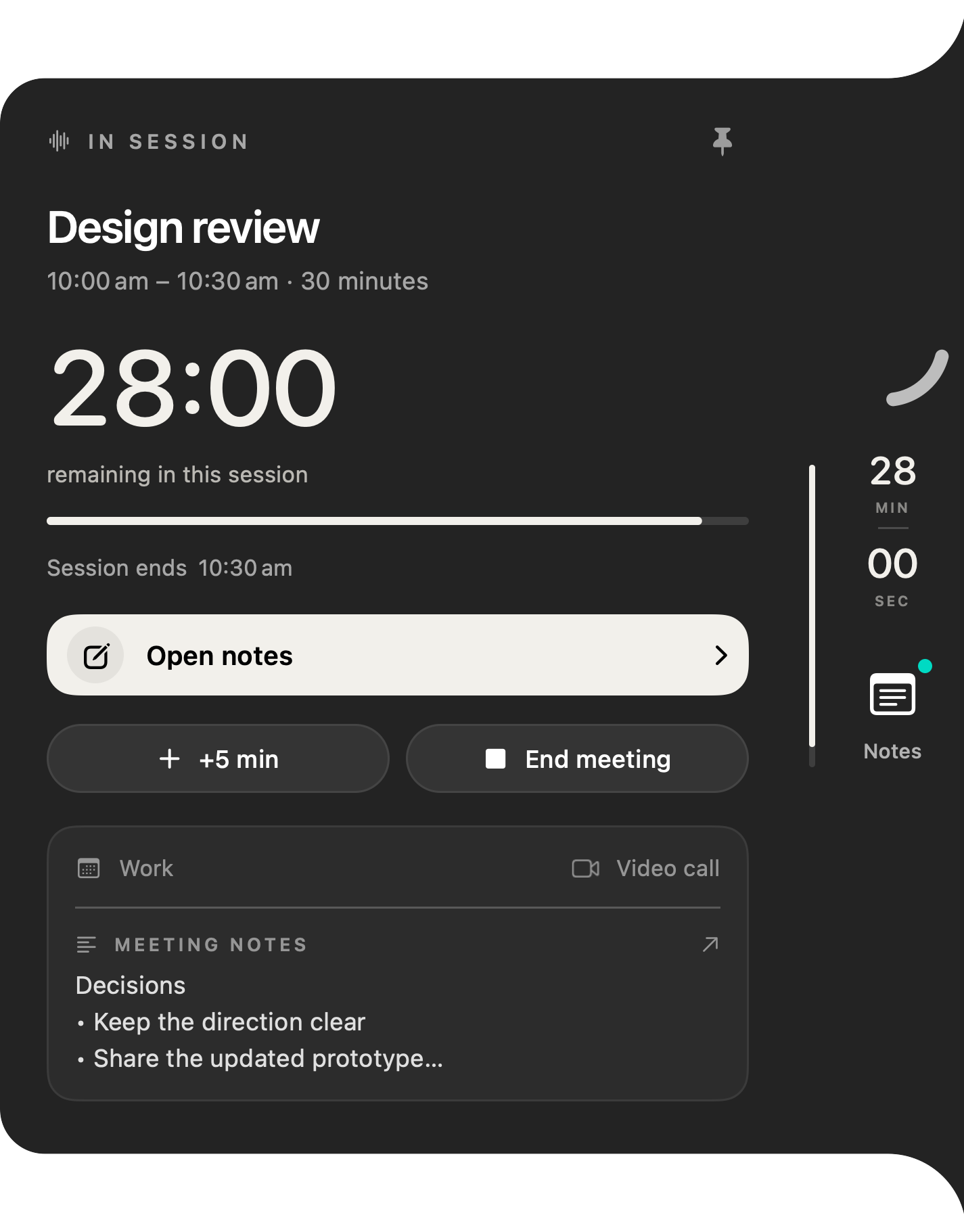
During the call
See exactly how long is left.
The time remaining stays at the edge of your screen. Running long? Add five minutes to your personal timer without changing the calendar invitation.
-
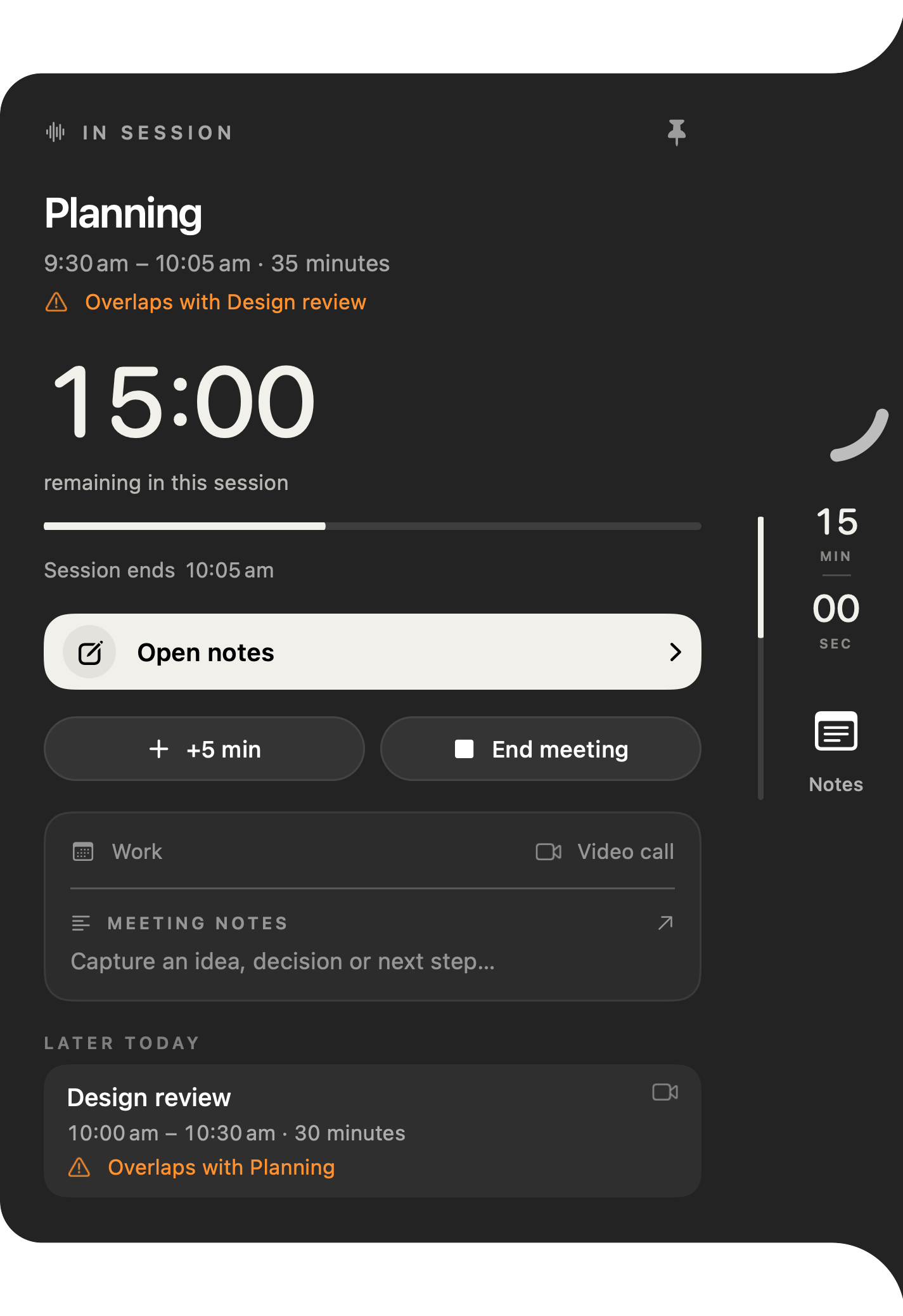
When plans collide
Spot the overlap.
When meetings in your selected calendars overlap, an orange “Overlaps with…” warning appears beside the meeting, with the rest of your day listed below.
-
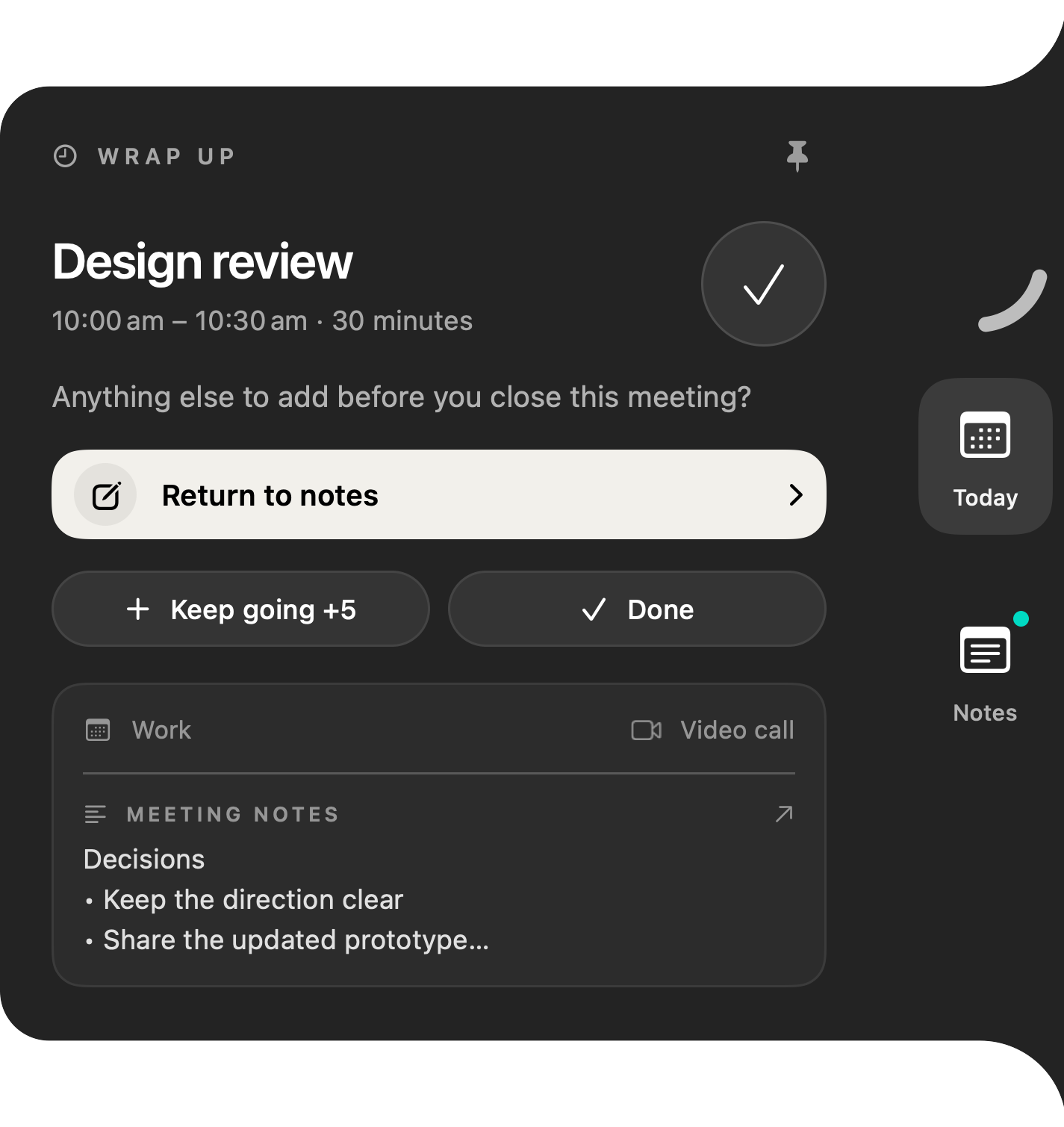
As time runs out
Wrap up on purpose.
When the meeting reaches its end, Interval asks if there’s anything else to add. Return to your notes, keep going for five more minutes, or mark it done.
-
Between calls
Fold it out of the way.
Fold Interval into a compact timer on any edge of your screen, and open it again when you need the details.
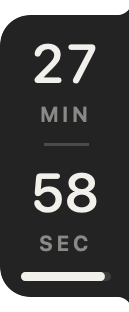
Current native views with fictional example meetings. Set up your meeting view.
Good thoughts.
Safely kept.
Decisions
Next steps
03 / SUPPORTING NOTES
Keep decisions
with the meeting.
When a decision needs saving, write a quick note beside the timer. Notes support the meeting workflow and stay in your notebook for later.
- Bullets & checklists
- A searchable notebook for later
- Export & optional iCloud sync
- Write and edit your own notes
04 / PRIVATE BY DESIGN
Your calendar stays yours.
Interval reads. It never writes.
-
Read-only calendar access
Interval reads only the calendars you select. It never edits events or invitations, and you can revoke access at any time in System Settings.
-
Processed on your Mac
Event titles, times and meeting links are processed on your device to power the panel, countdowns and reminders.
-
Recording stays optional
Public Mac 1.0 uses manual notes. The pending Mac 1.1 update records microphone and Mac audio only when you start it and grant permission. Processing stays on your Mac.
-
No Interval account
No sign-up, no advertising network and no cross-app tracking. Notes save on your Mac first; iCloud sync is optional.
05 / INTERVAL AT A GLANCE
The short version.
Interval is a native meeting timer for Mac. It reads the calendars you choose from Apple Calendar and keeps your next meeting, a countdown to its start, the time left in your current call and any overlaps in a small panel at the edge of your screen.
- Made for
- People who spend their day on video calls and want to join on time, finish on time and see clashes before they happen.
- Calendars
- Any calendar available in Apple Calendar on your Mac, with your permission. Read-only.
- Call links
- Supported Zoom, Google Meet, Microsoft Teams, Webex and FaceTime links in event details.
- Notes
- Optional manual notes with bullets, checklists, a searchable notebook, export and optional iCloud sync.
- Price
- £15.99 once for website lifetime access. One licence covers two Macs. Automatic app updates are included.
- Requires
- A Mac running macOS 26 or later.
- Mac 1.1 update
- Opt-in recording and local transcription, pending Apple review and release on both download channels. Draft notes need supported Apple Intelligence.
- Not included
- Automatic rescheduling or time tracking.
- Made by
- Cory Parry, an independent developer trading as Interval.
Interval is a great fit if you…
- Spend much of the day on Zoom, Google Meet, Teams, Webex or FaceTime
- Keep your meetings in calendars that appear in Apple Calendar
- Want to join on time and finish on time without watching the clock
- Prefer paying once to another subscription
Look elsewhere if you need…
- Unattended recording or guaranteed AI summaries on every Mac
- Automatic scheduling or rescheduling
- Time tracking or billable-hours reports
- A shared room or agenda timer for a whole team, or a Windows version
06 / PRICING
One price.
Yours to keep.
The website version has no subscription. Pay once, then download Interval and activate it on your Macs with the key we email you.
Prefer the Mac App Store? View Interval on the App Store for its own pricing. Website and App Store purchases are separate.
Interval for Mac
Website lifetime access
£15.99once
Currency is chosen automatically for your country. You can change it above.
- Lifetime access, no renewals
- One licence covers two Macs
- Automatic app updates included
- Activation key emailed after payment
- Requires macOS 26 or later
Pay before download. No website trial.
| Choose currency | One-time lifetime prices |
|---|---|
| GBP | £15.99 |
| USD | US$19.99 |
| EUR | €19.99 |
| AUD | A$29.99 |
These are the four supported checkout currencies. Outside these regions, including Canada, choose any supported currency; your bank may convert it and charge a fee.
PRACTICAL MEETING GUIDES
Make more room in your meeting day.
How to keep meetings on time on your Mac
Agree an end time, leave space for decisions and keep a personal countdown visible during the call.
Use a meeting countdown alongside Apple Calendar
Connect selected Mac calendars, check permission and keep meeting time visible beside your call.
Capture decisions and next steps beside your meeting timer
Write manual meeting notes beside a Mac countdown, find them later and export the text.
A practical Mac workflow for a day full of meetings
Use Calendar for commitments, a task manager for actions and a visible meeting timer for the call itself.
Use Google or Outlook calendars with a Mac meeting timer
Make your calendar events visible in Apple Calendar, then select them in Interval for a meeting countdown.
Join Zoom, Google Meet and Teams calls from your Mac calendar
Find supported meeting links beside a Mac countdown, and check what to do when the join action is missing.
What is Interval?
Interval is a native Mac meeting companion. It shows upcoming meetings, countdowns to starts and endings, reminders and overlap warnings in a small panel at the screen edge. It helps you keep track of your schedule. Manual notes are available when you need them.
Does it work with my calendar?
Interval works with calendars available through Apple Calendar, with your permission. Supported meeting links let you jump into your call from the app.
Does Interval work with Google Calendar or Outlook?
Interval doesn’t have its own Google or Outlook sign-in. It reads the calendars macOS makes available in Apple Calendar, so if your Google or Outlook account’s events appear in Apple Calendar on your Mac, you can select those calendars in Interval. Check your events there first. Read the calendar setup guide.
Which video call links does Interval support?
Interval recognises supported Zoom, Google Meet, Microsoft Teams, Webex and FaceTime links in a meeting’s event details. The join action opens the link and the call service takes it from there.
Does Interval change my calendar?
No. Interval reads the calendars you select and never edits events or invitations. Adding five minutes only extends your personal timer; the calendar invitation stays unchanged.
Does Interval record or transcribe meetings?
Public Mac 1.0 supports manual notes. Mac 1.1 is pending Apple review and release; it is not yet available from the App Store or website. The Mac 1.1 update adds opt-in microphone and Mac audio recording, on-device transcription and recoverable local drafts. Generated draft notes require supported Apple Intelligence hardware, language and settings; you can keep the transcript without it. Recording never starts automatically. Grant microphone and Screen & System Audio Recording permission, and let everyone know before you record. Mac audio can include other apps and notifications; no screen images are saved. Review the draft before adding it to your meeting notes. Saved notes can sync through iCloud if enabled; recording files stay local. See the recording privacy details.
Can I move the panel?
Yes. Slide Interval around the left, right, top or bottom edge of your Mac’s screen. The panel stays upright, and it folds into a compact timer when you want more space.
When can I get Interval?
The website version is available now with lifetime access for £15.99, paid once. Download Interval after payment is confirmed. Interval requires macOS 26 or later. It is also available on the Mac App Store.
Is Interval free?
Website lifetime access is a one-time £15.99 purchase, with no monthly or annual renewal. You pay before downloading; the website version has no trial. See the App Store listing for current plans and trial eligibility. Website and App Store purchases are separate.
How many Macs can I use it on?
One website licence covers two Macs. You can remove an old Mac from the download page after verifying your purchase email.
How do I use my website purchase?
After purchase, Interval emails you a download-page link and an activation key. Paste the key on the download page and your Mac download starts automatically. Open the DMG and drag Interval to Applications. Keep the same key for activation in the app. Automatic app updates are included. Read the website purchase terms for details.
Where do my notes go?
Notes are saved on your Mac and stay available in your notebook. You can export them or turn on optional iCloud sync. Read the privacy policy for details.